


Linktree: Link in bio creator
4.61.18K Reviews
App Specs
- Version
- 3.57.0
- Updated On
- License
- Free
- Downloads
- 1,000,000+
- Developer
- Linktree
- Categories
- Social
- Platform
- Android, iOS
Screenshots


 Analysis by AppCompare
When I rely on a link in a social profile, the important moment is often away from the desk: someone asks for my latest work, a customer wants the shop, or a follower wants to find the other places I post. Linktree is useful in those moments because it gives me one destination to share instead of making me choose a single profile or keep reciting several addresses. Its usefulness still depends on a working connection, so I think of it as a convenient doorway to online content, not a replacement for that content.
When a shared link has to do the work
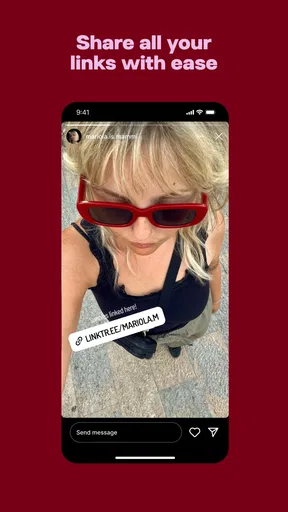
A link hub solves a small but common problem: social platforms tend to give people limited room to direct visitors elsewhere. I can put the hub in a profile, send it in a message, or show it to someone in person; the visitor then chooses which destination suits them. That is simpler than changing a profile link every time I publish something new, especially if I want older destinations to remain available alongside the latest one.
The trade-off is one extra step for the visitor. Instead of landing directly on a video, shop, or article, they first arrive at a page of choices. If I am promoting one time-sensitive item, a direct link can be clearer and quicker. I would use Linktree when I genuinely have several destinations to organize, and point straight to a single page when that is all the audience needs.
A practical routine for keeping the page useful
Imagine I post a new episode, share a behind-the-scenes clip, and keep a portfolio available for potential clients. Rather than repeatedly replacing the one link in my social profile, I can use a central page as the consistent destination and direct visitors to the relevant item there. The routine only works well if I maintain the choices: a link to an old campaign or a page that no longer helps the visitor makes the hub feel neglected.
My practical tip is to treat the first few links as a short menu, not an archive. Put the destination most relevant to the current audience near the top, keep essential evergreen pages easy to spot, and remove items that no longer serve a purpose. This is a simple editorial habit rather than a technical trick, but it can make the difference between a useful landing page and a crowded list.
Choosing it over a profile page or direct links
Compared with adding several links manually to a personal website, Linktree is appealing when I want a focused, quick-to-share hub rather than a broader site to design and maintain. Compared with a single direct link, it offers more choice but asks visitors to make another tap. A social platform’s built-in profile tools may be enough if I only need one destination or already have a layout that presents my links clearly.
I would not choose a link hub just because it is popular. A portfolio that needs detailed project pages, a shop that needs a full product catalogue, or a publication that needs its own navigation may be better served by the relevant website. Linktree can direct people to those services, but the central page itself does not make their content easier to browse once visitors leave it.
Worth Reading Before You Choose

EA SPORTS FC Mobile 26 Is a Bigger Football Game, but It Takes Time

Flipboard Shows What News Apps Must Do Beyond the Feed

Switching to Android Auto Means Rethinking Your Driving Routine

Google Calendar Makes a Crowded Week Easier to Manage

Ludo King Makes the Most of the Minutes Between Plans

Baby Panda World Brings Quick Play to Modern Phones, but Its Game Library Feels Busy
That distinction matters for creators and small businesses deciding what to share. The hub is a signpost, not a substitute for a well-organized shop, newsletter, podcast page, or portfolio. I find it most useful when the destinations are already worth visiting and the challenge is helping people find the right one.
Linktree is a free social app from Linktree, and it has an average rating of 4.6 from around 56,000 ratings, with more than 1 million installs. It is rated for Everyone, and the current version is 3.31.0. In-app purchases range from $4.99 to $359.99 per item, so I would check the available options in the app before paying; a basic need to gather links may not call for a purchase.
For someone who simply wants a handful of destinations together, the main question is less about filling every available slot and more about whether a separate hub helps their audience. For someone using links to earn income or attract clients, consistency and a clear route to the most important destination matter more than adding every possible button. Those are different needs, and the right setup should reflect them.
If the app or the linked service is slow to load, the experience can break at the point where a visitor needs it. I would keep the hub straightforward and avoid relying on it as the only way someone can reach a critical destination. Sharing a direct link in a time-sensitive conversation, or keeping a destination easy to find elsewhere, gives people another route if the hub does not load promptly.
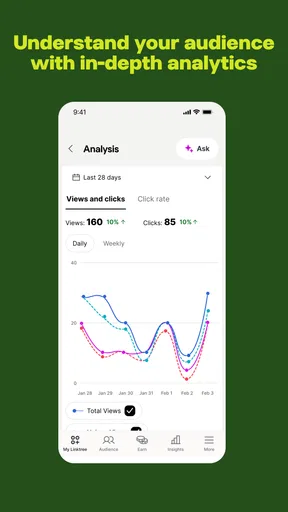
Connectivity also shapes how I judge the analytics described in the original app experience: click information is useful for comparing interest in destinations, but it should guide decisions rather than dictate them. A link with fewer clicks may still matter if it serves a smaller, more relevant audience. I would use the figures as clues about how people navigate, then consider whether link order, wording, or the audience for that post explains the pattern.
Linktree suits people who regularly send audiences to several online places and want a single, manageable destination. It is less compelling if I have only one link to share, need a full website, or cannot keep the destinations current. If I were deciding between it and a direct link today, I would choose based on the visitor’s task: one clear action calls for one direct destination; a changing collection of useful destinations is where a hub earns its place.
Hey there, fellow app enthusiasts! If you’ve ever felt like juggling your online presence across various platforms is akin to herding cats, let me introduce you to Linktree. This nifty app is here to save the day by simplifying how you share your links with the world. Imagine a single link that acts like a Swiss Army knife for your digital presence. Intrigued? Let’s dive into the details.
What is Linktree?
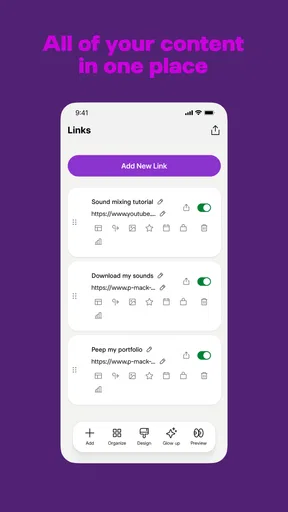
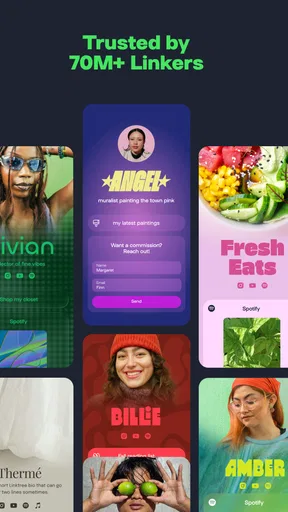
At its core, Linktree is a tool that lets you create a personalized and easily customizable page, acting as a hub for all your links. Whether you're an influencer, content creator, or a small business owner, having a central place for all your links is a game-changer. You can link to your social media profiles, websites, online shops, or any content you want your audience to access. It’s like having a digital business card that’s always up-to-date.
Setting Up: As Easy As Pie
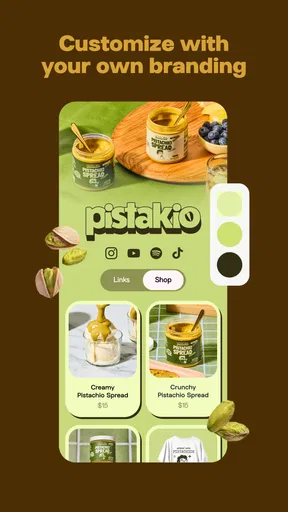
Getting started with Linktree is as easy as pie. Once you download the app, you just need to sign up and start creating your link hub. The interface is clean and intuitive, which I really appreciate because who has time to read a manual, right? You can either use one of their stylish themes or customize it to match your brand’s aesthetics, making it uniquely yours.
Features That Stand Out
Now, let’s talk features. First off, Linktree supports unlimited links. So, whether you’re linking to your YouTube channel, Etsy store, or your latest blog post, you can keep adding without a hitch. One feature that I found particularly useful is the analytics dashboard. It provides insights into how many people click your links and when. This is golden for anyone looking to understand their audience better.
Here’s a pro tip: Pay attention to the link analytics to optimize your online strategy. It’s like having a mini data scientist in your pocket!
Customization Galore
If you’re like me and love a bit of personalization, you’ll enjoy the customization options. You can tweak the appearance to your heart’s content, from backgrounds to button styles. Plus, there are options to integrate with other apps like Mailchimp, so you can even capture emails directly from your Linktree. It’s like having your cake and eating it too. Sweet!
Security and Reliability
Security is a biggie these days, and using Linktree feels safe. It’s nice to know that the app is reliable and you won’t have to worry about your link hub going down or your data being compromised. They’ve got a solid track record, which is a relief in a world where app reliability can sometimes be sketchy.
Who Will Benefit?
The beauty of Linktree is its versatility. Whether you’re an artist wanting to showcase your portfolio, a podcaster linking to your episodes across platforms, or a business promoting products, this app is a fantastic tool. It consolidates your digital footprint into one neat package that’s easy for your audience to explore.
In conclusion, if you want a simple yet powerful way to organize your online links, Linktree is the way to go. It’s user-friendly, packed with useful features, and customizable to fit your brand. So, what are you waiting for? Give it a whirl and watch how your online engagement levels up!
Pros
- Easy to set up and customize.
- Supports multiple social media links.
- Integrates with analytics tools.
- Mobile-friendly and responsive design.
- Offers a free basic plan.
Cons
- Limited customization on free plan.
- Some features require a paid upgrade.
- Occasional glitches in link updates.
- Basic analytics lacks depth.
- No direct e-commerce options.
FAQs for Linktree: Link in bio creator
What is Linktree and how does it work?
Linktree is a tool that allows users to create a single link for their social media profiles, directing visitors to a landing page with multiple links. It's particularly useful for platforms like Instagram, where users can only have one link in their bio. With Linktree, you can share your website, blog, online store, and more, all from one easy-to-access link.
Is Linktree free to use, or are there any costs involved?
Linktree offers a free version with basic features, which is suitable for most casual users. However, there is a Pro version available, which provides advanced features like analytics, custom themes, and more detailed customization options. The Pro version is available as a subscription service, offering monthly or annual payment plans.
How can I customize my Linktree landing page?
Customization depends on whether you're using the free or Pro version. In the free version, you can choose from a limited selection of themes and colors. The Pro version allows for more detailed customization, including the ability to use custom backgrounds, add images or icons to your links, and access to more advanced design features to fully tailor your landing page to your brand.
Is Linktree safe to use?
Yes, Linktree is considered safe to use. It uses SSL encryption to protect users' data and provides a secure way to display multiple links. However, as with any online service, it's important to use strong, unique passwords and be cautious about the type of links you share, ensuring they lead to reputable sites.
Can Linktree be integrated with other apps and platforms?
Yes, Linktree can be integrated with various apps and platforms. For example, you can connect Linktree with Google Analytics to track link performance. It also supports integrations with email marketing services, customer relationship management systems, and e-commerce platforms, allowing you to enhance your marketing and engagement strategies.


